Everything I've built, sized by weight. Click any node for the full story.
Learning Tech · live
AbsolutePath
A learning workspace built on learning science
Watching a video feels like learning; usually it isn't. AbsolutePath turns the YouTube videos you already watch into real practice — it primes you before you press play, pauses for checkpoint questions, then asks you to recall, explain, and come back later.
The loop around every video before → during → after → later
beforePrimeA short intro gives attention a direction
duringWatch & checkCheckpoint questions and timestamped notes
afterRecallYou answer first; feedback comes in stages
afterExplainFeynman explanation, typed or spoken
laterSpaced reviewTopics return on expanding intervals
right but unsure? it comes back sooner
Pathways turn a goal into ordered objectives and videos checked against their transcripts. Find My Gaps runs the same loop over your own videos, PDFs, and notes.
PathwaysA learning goal becomes ordered objectives and selected videos, verified against their transcripts, that you review before starting.
Retrieval practiceYou commit to an answer before any feedback, and the feedback arrives in stages.
Feynman explanationsExplain an idea in your own words, typed or spoken, and see what your explanation is missing.
“Are you sure?”Confidence checks turn lucky guesses into reviews instead of false mastery.
Spaced reviewEvery answer schedules its own return, sooner when you were right but unsure.
Find My GapsA formative check over your own material that shows what still needs another pass.
From the research to the product
Meaning matters when we encode
Craik & Tulving
Priming before the video and notes during it give attention a direction.
Feeling fluent is not proof of learning
Deslauriers et al.
A finished video never counts as understanding; checkpoints and feedback sit inside the flow.
Trying to remember is part of learning
Roediger & Karpicke
You answer before you see feedback, and Find My Gaps asks you to explain, not to re-read.
Leave room to return
Cepeda et al.
Answers come back as spaced reviews — sooner when you were right but unsure.
Watching and note-taking stay free; the AI steps run on an allowance. Bilingual, Turkish and English.
Student pilots build practice exams from the ATPL and PPL theory subjects they choose, review every answer right after submitting, and retest what they missed — with explanations that read like a good instructor and point to the textbook page.
One study session
Build an examBy subject, chapter, wrong, or unseen
Timed examThe real exam's rhythm
ReviewLands straight on every answer
ExplanationAnswer · why · why not the others · remember
Re-testRetake what you missed, or start fresh
missed questions feed the next exam
How an explanation is made
RetrieveFrom that subject's own textbook, never its answer keys
WriteClaude agents draft the four-part explanation
VerifyA gate checks it, and the answer must match the database
CiteBook and page stored beside the text
Explanations like an instructor'sThe answer, why, why not each other option, and one thing to remember.
Study assistantA RAG chatbot that answers study questions with page references to the training books.
Grounded in the booksRetrieval searches only the subject's own book and skips the books' question banks.
A gate that was tested firstThe verification gate had to catch a deliberately planted error before it checked real explanations.
Figure questionsDiagrams appear in the exam and the review, click to enlarge.
Retest loopRetake only what you got wrong, or start a fresh exam on the same subjects.
I own and operate the platform: took it in-house, hardened it for launch, and built its AI explanation and retrieval layer, working with flight-training faculty at Özyeğin University.
React / Vite / TypeScript / Node.js / SQL Server / Claude agents / BM25 retrieval
From a wall of AI ideas to one buildable architecture — with priority guidance
As a forward deployed engineer at TRAI, I worked with member enterprises on adopting agentic AI. One case in depth, anonymized: a large, licensed online sports-betting platform in Türkiye brought the AI ideas from its ideation workshop — four departments, 65 use cases, every idea rated top marks — and asked what to build, in what order, and how to keep it safe. I grouped the ideas by the data they read and the decision they make, drew them as four connected flows on one shared core (23 building blocks), split every step into a fast typed decision or a reasoning model, and ranked them.
One of the four flows — Flow A · Observe, the observation layer for the platform and its databases. Hexagons are System One typed decisions, dashed boxes are reasoning steps, shaded blocks are mini-projects: select one to read what it does.
Mini-projects in this flow — select one to highlight it and read what it does
Select a mini-project
Flow A is the observation layer: metrics, logs and alarms from OEM, Zabbix and Grafana; a Health Check pass turns the stream into typed decisions; anything not normal goes to the Incident Investigator, which writes what it finds into a shared memory and one daily report.
typed decision — System One model, fixed answer setreasoning step — internal LLM, explains itselfa person approves actions
Read the full case study →All four flows as exact diagrams, Top 5 and ranking, data & access, roadmap, and the Engineering, Governance & Security and Finance sessions.
Elsewhere at TRAI, I scoped enterprise requests — on-premise document intelligence for a major grocery retailer, image processing for a glass manufacturer, voice agents in finance — into prioritized building blocks and matched them with startups from Türkiye's AI ecosystem.
Flow AMonitoring / DB Health CheckProgramme
What it doesRuns on a schedule (every few minutes for metrics, daily for the routine DB checks) over the metric samples, logs and baselines the connectors have already collected from OEM, Zabbix and Grafana. For every window and every target it asks one typed question — is this normal, a warning or critical, and which category — and writes the answer to triage_decision. Normal windows go straight to the daily report; warnings and criticals are handed on. It never opens a ticket or changes anything; its whole job is to turn a stream of numbers into a short list of things that deserve a look, before the monitoring system itself would have alarmed.
Use cases it covers · how it connectsCovers Monitoring Agent and DB Health Check — the IT platform team's two 'watch everything routinely' entries, which are the same worker with a platform profile and a database profile. It is the head of Flow A: everything downstream (the Investigator, Disk Space, DR Readiness, the daily report) is fed by the triage decisions it writes, and its baselines are the ones Capacity Prediction later forecasts on. In Flow B the same triage table is written by Alert Triage for the alarm stream, so the two flows meet in one table.
Use cases in this block — select one for its row in the ranking
What it doesStarts when Health Check flags a warning/critical, when OEM, Zabbix or Grafana raises an alarm, or when a DBA asks it directly. It then works through the DBA's own checklist — CPU, AWR/ASH, top SQL, plan changes, blocking, wait events, OS metrics, the last deploys — pulling each piece of evidence through the connectors, asking the small classifier "is this check abnormal?" for each one, and reasoning only over the abnormal ones. It compares the picture with previous similar incidents in the finding memory and returns a root-cause statement plus a recommended fix, as a report the DBA can keep questioning. It recommends; a person acts.
Use cases it covers · how it connectsCovers DB Incident Investigator Agent, with AI Incident Analyzer (DevOps) and Load Balancer Troubleshooting as the same worker with different profiles. It sits in the middle of Flow A: triggered by the Monitoring/Health Check block above it or by a raw alarm, it consumes the change records from Flow C's deployment path and writes to the incident memory that the Postmortem block in Flow C and the report narrative both read. It is also the reasoning step that Flow D's Database agent exposes conversationally.
Use cases in this block — select one for its row in the ranking
DB Incident Investigator#10 · 89 · ★★ — Multi-step root-cause analysis (AWR/ASH, top SQL, plans, blocking, deploy correlation)
Flow ADisk SpaceQuick win
What it doesListens for the Zabbix low-disk alarm on a server, collects that server's disk state and picks one of four typed outcomes — clean up, extend, escalate, wait — with a confidence score. Above the confidence threshold the cleanup or extension is queued as a disk_action for the on-call engineer to approve; below it, the case is escalated with the evidence attached. After the action runs it checks whether the alarm cleared and records the outcome, so the threshold can be tuned on real history.
Use cases it covers · how it connectsCovers Disk Space. In Flow A it is a leaf hanging off the triage decision — the first case where a decision turns into an approved action. In Flow B the same decision class reappears inside Alert Triage / Auto-Remediation, and AI Disk Capacity Manager extends it with the forecast side; when Flow B is built this block is absorbed there, which is why it is listed as 'same worker' on the Top 5.
Use cases in this block — select one for its row in the ranking
What it doesOn a schedule it runs the DR readiness checklist across databases, file shares, hosts, Kubernetes and third-party access, reusing the health and capacity signals the other workers already produce instead of collecting again. Each component gets a typed verdict — ready, at risk, not ready — stored as dr_check rows, and the result is a readiness scorecard with the list of gaps. The only new connectors it needs are the P5 ones (Kubernetes state, file shares, third parties).
Use cases it covers · how it connectsCovers DR Failover Readiness Agent. It is a consumer, not a producer, in Flow A: it takes the health signals from the Monitoring block, the capacity forecasts (Capacity Prediction) and the recent change records, adds the P5 infrastructure checks that no other block needs, and produces a scorecard. Nothing downstream depends on it, so it can be built whenever the P5 connectors are settled without blocking the rest of the flow.
Use cases in this block — select one for its row in the ranking
What it doesIngests the daily cloud billing export, computes a statistical baseline per service/account/region and raises a cloud_cost_anomaly when spend deviates from it — that part is plain statistics. The classifier then attributes the spike (service, account, region, category) and decides whether an emergency shutdown should be recommended; only then does an LLM step write the safe shutdown procedure for the on-call engineer. Nothing is switched off automatically.
Use cases it covers · how it connectsCovers Cloud Cost Monitoring (and the cost-reporting side of CDN Data Transfer, whose AI part was dropped). It is a self-contained branch of Flow A with its own data plane — billing exports — and only touches the shared flow at the end, where its anomaly and attribution join the day's findings and the report. In Flow D it is served by the Cloud, CDN & ticketing agent.
Use cases in this block — select one for its row in the ranking
What it doesThe single reporting step every worker in this flow shares. Once the day's findings are stored and decided, one LLM call writes the short narrative at the top of the daily/weekly report — what happened, what is trending, what needs attention — while every table and number in the report comes from the data, not from the model. One template, one distribution channel, so Monitoring, Health Check, Capacity and DR do not each grow their own report.
Use cases it covers · how it connectsNot a use case of its own: it is the reporting step shared by Monitoring Agent, DB Health Check, Capacity Prediction and DR Readiness (and by every other worker in the core). It closes Flow A — every block above it ends in a finding, and this block is what turns the day's findings into the document the team reads. The same template is reused by Flow B (alert summaries), Flow C (daily CI summary) and the NOC report that already runs on the NetSec side.
Use cases in this block — select one for its row in the ranking
A warn/critical triage decision or an OEM/Zabbix/Grafana alarm, plus the metrics, logs and recent deploys around it.
▼
What it does
Works out why the database is misbehaving and proposes what to do about it.
▼
Output
A root-cause statement and resolution proposals for the on-call DBA (incident + finding rows).
Does
Given a warn/critical triage decision (or a direct OEM/Zabbix/Grafana alarm), forms hypotheses about the root cause, decides which checks to run, interprets AWR/ASH, top SQL, plan changes, blocking, wait events, OS metrics and recent deploys, and writes a root-cause statement with resolution proposals.
Input
triage_decision row · metric_sample / log_event windows · catalog_object (plans, locks) · change_record (last deploys) · similar past incident rows
Reasoning-class LLM with tool use (agent loop); ~5–15 tool calls per incident
Typed decisions around it
Each routine "is this metric/check normal?" question is answered by the typed classifier; the LLM only reasons over the checks the typed classifier flags. Estimated 70–80% fewer LLM tokens per incident.
How often
Per warn/critical event — tens per day, not thousands
Human in the loop
Recommend-only. The DBA on call reads the incident and acts; nothing is executed.
Why a reasoning LLM, not a typed decision
Multi-step, open-ended, needs chained hypotheses and narrative — outside the typed classifier's typed-decision scope.
Reasoning LLM call
Report narrative
Use cases: Monitoring, Health Check, Capacity, DR Readiness, Legal Reporting
Input
The day's findings, already decided and stored.
▼
What it does
Writes the short summary text at the top of the daily/weekly report.
▼
Output
The narrative section of the report; the tables come from data, not from the LLM.
Does
Turns the day's structured findings into the short narrative section of the daily/weekly report: what changed, what needs attention, what was resolved. It does not decide anything — all decisions are already in the finding rows.
Input
finding rows of the period · capacity_forecast · dr_check · legal_report_check
Output
report.body (narrative section) — the tables in the report are rendered from data, not by the LLM
Model / shape
Small/medium LLM, single call, no tools
Typed decisions around it
None — inputs are already typed. Optional: the typed classifier guardrail "does the narrative contradict the findings?" before publishing.
How often
Once per report (daily / weekly)
Human in the loop
Report is reviewed by the platform lead before distribution.
Why a reasoning LLM, not a typed decision
Text generation. Could be replaced by a template for the first phase; the LLM earns its place when readers want prioritised prose rather than a table.
Reasoning LLM call
Shutdown method
Use cases: Cloud Cost Monitoring
Input
A cost-spike record where the typed classifier has attributed the source and recommended shutdown.
▼
What it does
Explains how to shut that specific cloud service down safely.
▼
Output
A step-by-step procedure for the on-call engineer (finding.recommendation).
Does
When the typed classifier attributes a cost spike and recommends emergency shutdown, explains how to shut the specific service down safely (dependencies, order, rollback), for the on-call engineer to execute.
Input
cloud_cost_anomaly row (attributed_to, expected vs actual) · service_dependency if available · runbook snippets
Output
finding.recommendation (procedure text)
Model / shape
Medium LLM, single call, may retrieve runbook text
Typed decisions around it
The spike detection is statistics; the attribution and the shutdown decision are the typed classifier. The LLM only explains the "how".
How often
Rare — only on shutdown_recommended = true
Human in the loop
Nothing is shut down automatically; the engineer decides.
Why a reasoning LLM, not a typed decision
Procedural explanation that depends on context — text, not a typed decision.
Typed decision · System One model
Triage decision (metrics · logs · alarms)
Use cases: Monitoring Agent · DB Health Check · Disk Space · DR Readiness · Cloud Cost
Input
One metric/log window or one alarm for one target, with its baseline.
▼
What it decides
Decides whether it is normal, a warning or critical — and which class of problem it is.
▼
Output
A triage_decision row with the class, category and confidence, routed to the next worker.
warn → LLM worker only if confidence ≥ 0.7; below that it is logged and batched for the daily report.
Model / shape
System One model: structured input in, one of a fixed set of typed answers out, with a calibrated confidence. The threshold becomes a product decision once calibration has been measured on the team's own history.
How often
Every window on every target — thousands per day; the highest-volume decision in the core.
abnormal or unclear → passed to the LLM; normal with confidence ≥ 0.8 → skipped.
Model / shape
System One model: structured input in, one of a fixed set of typed answers out, with a calibrated confidence. The threshold becomes a product decision once calibration has been measured on the team's own history.
How often
~10 per incident.
Feeds
Flagged checks only → Incident Investigator LLM
At work · Quanted, London
Multi-Agent Data Pipeline
From raw financial data to validated features
Multi-agent systems that onboard a new financial dataset end to end — checking it, profiling it, researching it against the literature, proposing features, writing the code, and validating what's worth keeping.
One dataset, end to end state saved after every node
IntakePre-flight checks; questions to the provider
ProfileAn agent profiles columns through tools
ResearchPapers found by hybrid vector + keyword search
ProposeFeatures from several angles
Generate codeBuilt in stages, not one shot
ValidateSandboxed run, statistical checks, report
Resumable by designEach node reads earlier state and writes only its own; a crashed run resumes from its last checkpoint.
Literature-groundedAcademic PDFs are parsed and indexed for hybrid retrieval before any feature is proposed.
Staged code generationScaffold first, then loader, missing-data handling, feature methods, and wrapper.
Statistical validationA Granger-based layer keeps only features with temporal predictive relevance.
Sandboxed executionGenerated code runs in an isolated container before anything is trusted.
Observable runsA live dashboard streams each run's decision log and model usage.
The question of how to make the feature-generation step itself improve became my research project — see Granger-Guided Autoresearch.
A public knowledge assistant for Türkiye's AI ecosystem
A public Turkish assistant over everything TRAI has published — posts, reports, and recorded talks. Every answer cites the exact report page or video timestamp, and it declines when the material doesn't cover the question.
From archive to cited answer
CollectPosts, reports, recorded talks
Read & enrichTalks transcribed locally; tables and figures described
IndexMeaning + keyword search on Postgres
AnswerOnly from the passages retrieved
Cite or declinePage or timestamp — or “not covered”
Citations you can checkEach claim links to a report page or a moment in a talk.
Declines honestlyWhen the archive doesn't cover a question, it says so instead of improvising.
Nothing left unreadTalks without captions were transcribed locally; report tables and figures were read and described before indexing.
Domestic modelAnswers run on a model hosted in Türkiye; its hardened client later powered the member assistant.
A 500+ startup network, a members' dashboard with an AI assistant, and the console behind them
I built TRAI's ecosystem platform as its sole developer: a self-service portal for the 500+ startups in TRAI's network, a members-only dashboard where enterprises explore those startups with an AI assistant, and the console and agent worker the TRAI team runs on.
01 Three apps, one database — and row-level security decides who sees what.
Startup Portal
for founders in the network
Email-code verified signup
Field-by-field reviewed profile drafts
Versioned profiles
Teammates & AI-technology tags
Member Dashboard
for member enterprises
Startup directory with facets
AI use-case landscape & library
One-click intro requests
AI assistant on every page
Internal Console
for the TRAI team
Startup inventory & review queues
Introductions CRM
Research requests to an agent worker
Assistant controls & usage
▲ every read is checked against the signed-in role ▲
One Postgres database
row-level security policies · role-based routing · private storage · approved-field views · email-delivery tracking · usage written only through database functions
The startup portal
How a startup joins and stays current
Sign upVerified by an emailed code
File a startupUnknown emails get no access by default
Safe open signupA database trigger gives an unrecognised email no role and no profile, and self-signup can never attach someone to an existing startup.
Profiles that stay trueFounders keep their own profile current; every change is reviewed and kept as a version.
Private by defaultLogos and files sit in private storage; ownership of every page is checked in the database.
Quiet rate limitsOver-limit responses look like normal ones, so they never reveal which emails exist.
The member dashboard and its assistant
One assistant turn answers are validated before they're sent
QuestionFrom any page of the dashboard
Limits & budgetEnforced inside the database
Read as the memberNever with admin access
Search toolsStartups, use cases, TRAI content
Check every linkUnsourced links become plain text
Answer, loggedMarked as AI-generated
Tools over a catalog, by choiceStartup descriptions are short and the catalog fits in context, so the assistant calls search tools instead of vector retrieval.
Confidentiality in the databaseStartup data reaches the model only through a view with an approved field list — no contacts, financials, client names, or private links.
Human-approved anonymizationMembers see team-written masked copies; if the original changes, the startup leaves the assistant until a person re-reads it.
No invented facts or linksEvery fact must come from a tool call in the same turn, and every link from that turn's results.
Clear boundariesIt declines valuations, contact details, and what other members are doing, and refusals are logged as refusals.
OperableA kill switch, a daily token budget, readable transcripts per company, and an evaluation set that scores facts, not wording.
The console and the agent worker
A research request, from form to report
RequestMatchmaking, startup or ecosystem research
QueuedA typed job in Postgres
ClaimedOne worker per job, oldest first
Claude skill runsInventory, research, report assembly
Human reviewShortlists wait for approval
Report backLive progress, signed download
Introductions CRMBoth sides of every introduction are linked records, and closed member intro requests file themselves.
One inboxA “Needs attention” view across signups, profile drafts, contacts, and email delivery.
Clear ownership of statusThe app only creates requests; only the worker moves them forward.
Protected reportsReports sit in private storage and open through short-lived links for the requester or an admin.
Autonomous prompt optimization for agentic financial feature engineering
An LLM pipeline proposes financial time-series features and writes their code. A frozen statistical evaluator measures how often each feature's past helps predict future returns. An autonomous loop edits only the feature-generation prompt — and keeps an edit only when the overall score improves.
The autoresearch loop only the prompt moves
OptimizerProposes one edit to the prompt
GeneratorThe agentic pipeline regenerates features and code
frozen
EvaluatorRolling-window Granger tests vs forward returns
Composite scoreWithin each dataset, then across
Keep or revertOnly a strictly higher score survives
the best prompt so far becomes the next starting point
Only the prompt movesData loaders, targets, evaluator, and score stay locked — so any gain comes from the prompt.
A statistical judgeEach feature is tested in rolling one-year windows; the score is the share of stable windows where its past helps predict returns.
Careful windowsLags chosen by information criterion, series differenced when non-stationary, unstable windows excluded.
AuditableThe prompt, best score, and full history live in files, so the loop restarts and replays.
What the search foundThe best edits first simplified the prompt, then added targeted signal patterns.
Honest framingGains read as predictive relevance under a fixed evaluator — not causality, not trading profit.
The paper
Granger-Guided Autonomous Prompt Optimization for Agentic Financial Feature Engineering
Alperen Cengiz Öztürk, David Forino, İsmail Arı · Özyeğin University · Quanted Technologies
Ranks mentor shortlists for a mentoring platform from a Neo4j knowledge graph of profiles, requests, and historical matches — helping the matching team find good candidates that rigid filters miss, while the final decision stays with a person.
From graph to explained shortlist
GraphAnonymized profiles, requests, past matches
DiscoverSeveral Cypher paths in one query
ScoreCompetency fit, request intent, capacity
RerankOne LLM call over a JSON shortlist
ExplainA Turkish rationale per match; a person decides
Multi-path discoveryCandidates come from competencies, sectors, experience, departments, and prior requests.
Fit over volumeJaccard similarity rewards a tight match over a long list of competencies.
The LLM never touches the graphPython builds the payload; invalid JSON is retried with feedback.
Evaluated offlineReplaying historical matches exposes false negatives and guides each change.
Evidence from PDFs and spreadsheets, self-checked · KKB Agentic AI Hackathon finalist
A LangGraph agent that answers long questionnaires — built for ESG reporting — by retrieving evidence from PDFs and spreadsheets, then judging its own answers for faithfulness before submitting them.
ReAct to gather, Reflexion to check
IngestPDFs, spreadsheets, URLs
SupervisorPicks the next tool
ToolsSearch, cell lookup, calculator
GenerateA JSON answer with citations
JudgeScores faithfulness to the evidence
below the bar → revise and retry
Spreadsheets as gridsFuzzy search finds candidate cells, the model picks the right label across Turkish and English, then reads the surrounding grid.
Split, then shareMulti-choice questions become yes/no sub-questions that share their evidence.
Anti-loop guardsDuplicate tool calls are blocked, and claimed calculations must actually run the calculator.
The way I build AbsolutePath, made reusable: persistent project memory, clear agent responsibilities, independent review, and evidence checks from implementation through deployment — so coding agents ship work you can trust.
Adoption, designed like a lesson paste one line into your coding agent
AskWhich project, fresh or ongoing
AssessOne bounded, read-only pass
ScopeAssessment, pilot, or staged rollout
You approveOnly missing pieces are added
PilotOne small guided task teaches it
Status only moves with evidence
Built
Reviewed
Merged
Deployed
Verified in production
Risk routingEach change's risk tier decides between a fresh reviewer, a named specialist, or human acceptance.
Independent reviewReview packets leave out earlier conclusions; findings live in their own register.
Fits what you haveIt works inside your project's existing files instead of imposing a layout.
Nothing to installA method and templates — no runtime, no dependency.
Claude Code / agent workflows / documentation-as-system
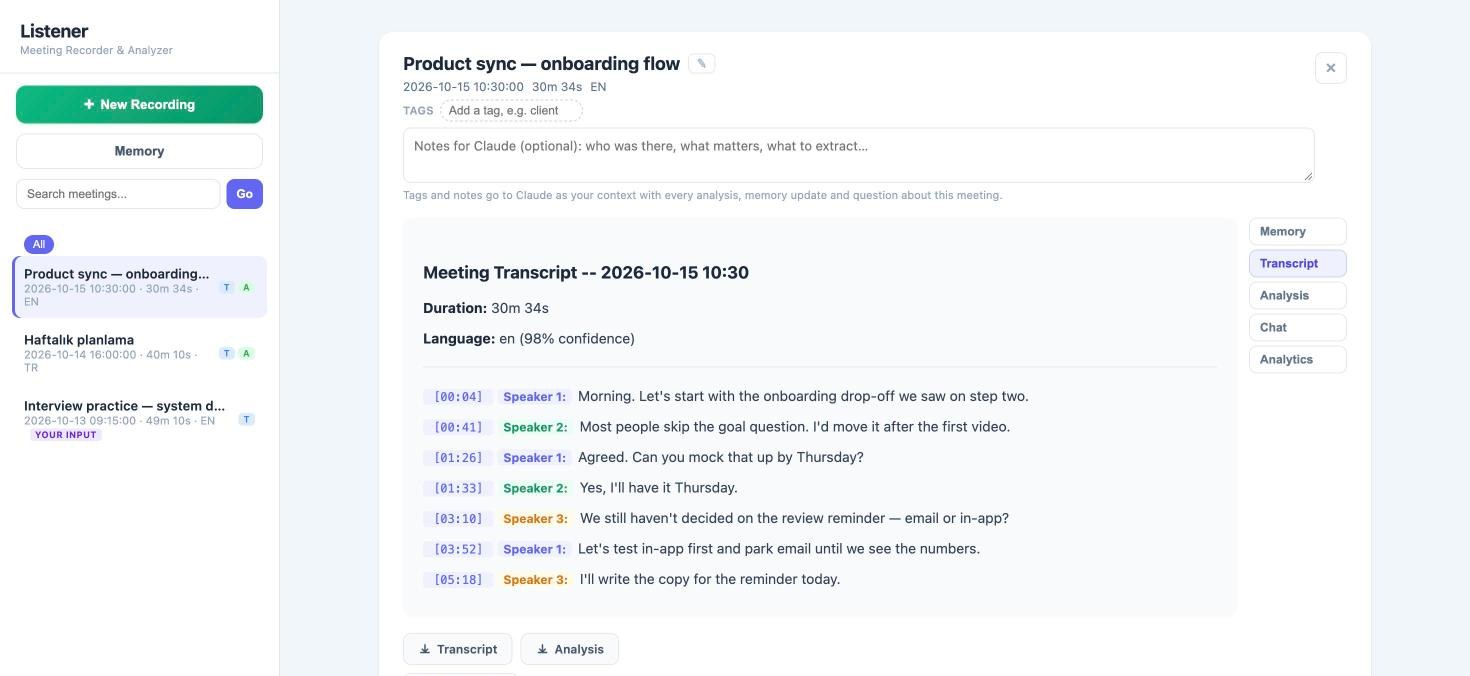
A Mac app that records, transcribes, and analyzes conversations while raw audio never leaves the machine — and remembers them, so you can ask across every meeting and get cited answers.
The meeting view — timestamped, speaker-labelled transcript with Memory, Analysis, Chat, and Analytics tabs. Shown with sample meetings.Where each step runs
on your Mac
RecordMic or imported file
QueueYou choose what to process
TranscribeWhisper, resumable
SpeakersDiarized and aligned
when you ask
Analyze & rememberDecisions, owners, deadlines
Meeting memory bankDecisions, action owners, deadlines, and open questions stay tied to transcript timestamps.
Ask across meetingsQuestions over selected meetings come back with the source meeting cited.
Lanes that never blockRecording, transcription, and analysis run separately; the AI runs only when you press the button.
Built for TurkishMixed Turkish/English detection and full-text search that handles Turkish diacritics.
Edits surviveYour corrections persist when an analysis is regenerated.
Monocular height estimation — predicting building height per pixel from a single satellite image, with Huawei R&D as industry partner, for automated 5G network planning. Supervised by Prof. Hasan Fehmi Ateş.
Özyeğin University Racing Team
2025 — present
Autonomous Team Leader — Formula Student UK, driverless
B.Sc. Computer Engineering, Özyeğin University — High Honor.
Honors
1st place — SOCAR Türkiye × AWS AI Mini Bootcamp
Finalist & presenter — KKB Agentic AI Hackathon
About
I build learning experiences where learning science meets AI. Teaching keeps me honest about it — I compete in and teach International Latin ballroom dance, and make videos about learning and AI on YouTube and Instagram.